Pixel Screen (16x16)

Pixel Screen (16x16)

Visualization signal_cellular_alt Advanced schedule 30 min

Pixel Screen (16x16)

Overview

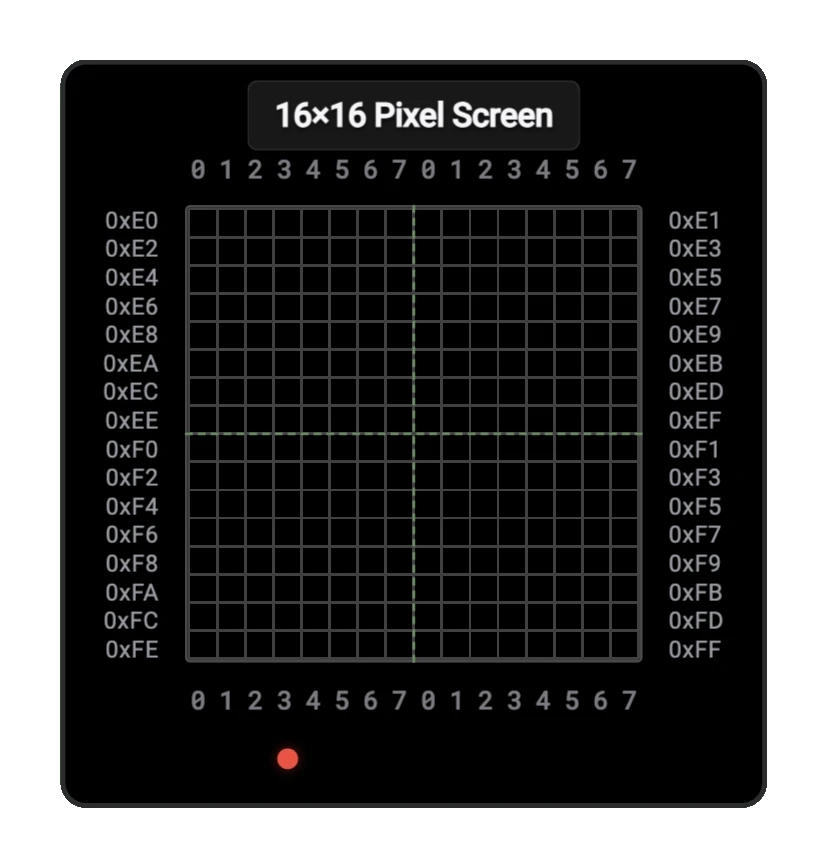
  • Purpose: The Pixel Screen (16x16) is a visualization component that displays a 16x16 grid of pixels, with each pixel's state determined by memory values. This component is useful for creating simple graphics, displaying patterns, or visualizing memory contents in your digital circuits.
  • Symbol: The Pixel Screen is represented by a rectangular display grid. It has no external connection pins — it reads display data directly from a connected RAM component's internal memory.
  • DigiSim.io Role: Provides visual output capability for digital circuits, enabling graphics display, pattern visualization, and memory content monitoring.

Pixel Screen 16x16 component

Functional Description

The Pixel Screen component reads its display data from a connected RAM component, interpreting each bit in memory as a pixel that can be either on or off. The component offers a resolution of 16x16 pixels (256 pixels total), which requires 32 bytes of memory to represent (1 bit per pixel).

Pins

The Pixel Screen has 0 inputs and 0 outputs. It does not have any external connection pins. Instead, it reads display data directly from a connected RAM component's internal memory, using the configured start address to locate the pixel data.

Configuration

The Pixel Screen has several configurable properties:

  1. Start Address: The starting memory address where the display data begins (default: 0xE0)
  2. Foreground Color: The color of active (ON) pixels
  3. Background Color: The color of inactive (OFF) pixels
  4. Pixel Scale: The size of each pixel in the display

Memory Mapping

The 16x16 pixel grid is mapped to memory as follows:

  • Each byte in memory represents 8 horizontal pixels
  • 32 consecutive bytes (256 bits) are used for the entire display
  • Bits are mapped from MSB to LSB within each byte

For example, with a start address of 0xE0:

Address Byte Description
0xE0 [76543210] First 8 pixels of row 0
0xE1 [76543210] Last 8 pixels of row 0
0xE2 [76543210] First 8 pixels of row 1
0xE3 [76543210] Last 8 pixels of row 1
... ... ...
0xFE [76543210] First 8 pixels of row 15
0xFF [76543210] Last 8 pixels of row 15

Note: Bits 7-0 within each byte represent 8 horizontal pixels, mapped from MSB to LSB

Usage

To use the Pixel Screen component:

  1. Add the component to your circuit alongside a RAM component

  2. The Pixel Screen automatically reads from the connected RAM component's memory — no pin wiring is required

  3. Set the Start Address in the component's properties to specify where in RAM the display data begins

  4. Write bit patterns to the memory addresses to create your display:

    • Write a 1 to turn a pixel ON
    • Write a 0 to turn a pixel OFF
  5. The display updates automatically as RAM contents change

Example Applications

Simple Pattern Display

// Store a checkerboard pattern
// First row (alternating pixels)
RAM[0xE0] = 0b10101010;
RAM[0xE1] = 0b10101010;
// Second row (inverted pattern)
RAM[0xE2] = 0b01010101;
RAM[0xE3] = 0b01010101;
// Repeat pattern for remaining rows...

16x16 Sprite Display

// Display a simple face
// Eyes (rows 4-5)
RAM[0xE8] = 0b00100100;
RAM[0xE9] = 0b00000000;
RAM[0xEA] = 0b00100100;
RAM[0xEB] = 0b00000000;
// Mouth (row 10)
RAM[0xF4] = 0b00011000;
RAM[0xF5] = 0b00100100;

Creating Animations

To create animations:

  1. Update the RAM contents for each frame
  2. Use a clock divider to control the refresh rate
  3. Synchronize RAM writes with the display's refresh cycle to prevent flickering

Tips and Tricks

  • Use a separate RAM area as a "back buffer" to prepare the next frame, then copy it to the display area to prevent flickering
  • Create drawing routines to set individual pixels by calculating the appropriate bit and byte
  • For color effects, you can modify the foreground and background colors through the component's properties
  • Combine with other components like counters or control units to create autonomous displays
  • For smooth animations, ensure your circuit updates the display at a consistent rate

school 학습 경로

arrow_back 사전 요구 사항

arrow_forward 다음 단계

help_outline 자주 묻는 질문

How does the pixel screen work?

The 16x16 screen has 256 pixels, each controlled by binary signals. Address the X and Y coordinates and set the pixel value.

How is pixel data organized?

Typically uses X and Y address inputs to select a pixel, with data input to set its state (on/off or color value).

play_arrow 실시간 회로 실행

다른 컴포넌트 보기