
Karnaugh Maps: Visual Boolean Simplification
A Karnaugh map arranges a truth table on a Gray-coded grid where adjacent 1s group into minimal SoP terms, replacing algebra with visual pattern recognition.

TL;DR: A Karnaugh map (K-map) arranges a truth table into a Gray-coded 2D grid where adjacent cells differ by one variable. Grouping adjacent 1s into rectangular powers-of-two produces minimal Sum-of-Products expressions directly — no algebra needed. K-maps reliably minimize functions of up to 4 variables; for 5-6 use Quine–McCluskey, and beyond that, ESPRESSO-style algorithmic synthesis.
Algebraic simplification using Boolean laws works, but it depends on spotting the right factoring at the right time. Miss one opportunity and you end up with a suboptimal result. For expressions with four or more variables, the number of possible manipulations explodes.
The Karnaugh map (K-map) solves this problem by converting algebraic simplification into visual pattern recognition. Developed by Bell Labs physicist Maurice Karnaugh in 1953, it arranges a truth table into a two-dimensional grid where adjacent cells differ by exactly one variable. Grouping adjacent 1s on the grid directly produces minimal Sum-of-Products expressions — no algebraic manipulation required.
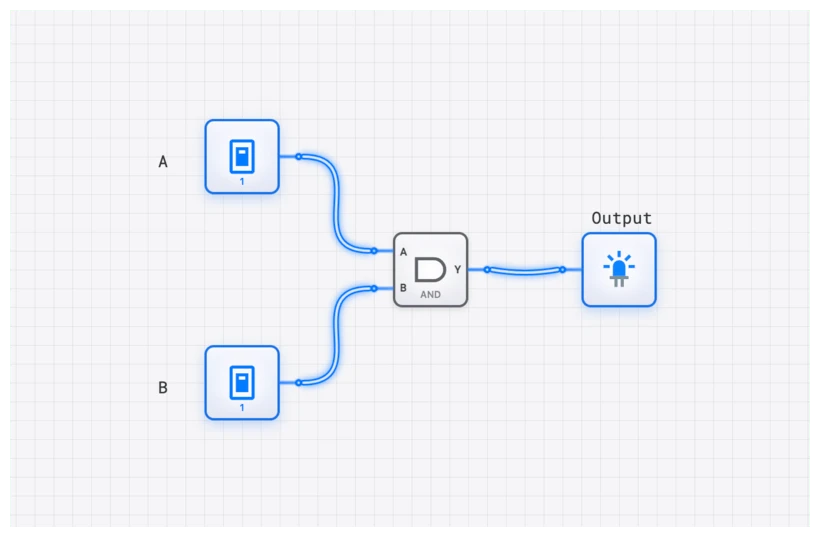
The Visual Truth Table: What is a K-Map?
At its core, a Karnaugh map is a truth table in disguise. While a truth table lists inputs and outputs in a linear, vertical fashion, the K-map rearranges them into a two-dimensional grid. This isn’t just for show. The genius of the K-map lies in its specific arrangement of cells.
In a standard truth table, the rows follow a binary count (00, 01, 10, 11). In a K-map, the rows and columns follow a sequence known as Gray code. In a Gray code sequence, each adjacent number—whether you move horizontally or vertically—differs by only a single bit. This property, known as logical adjacency, is the engine that drives simplification. When you group adjacent cells containing ‘1’s, you are visually identifying variables that change (and thus don’t affect the outcome) and eliminating them, leaving behind a minimal Boolean term.
Before we dive into the complex 4-variable maps used in modern ALU design, let’s look at the fundamental 2-variable map for inputs and . It consists of cells, representing the four possible minterms.
| () | () | |
|---|---|---|
| () | () | () |
| () | () | () |
Notice the adjacency: moving from to , only variable changes. Moving from to , only variable changes. This physical proximity on the grid represents a logical relationship that we can exploit to reduce our gate count.
The Art of Grouping: From Maps to Minimal Logic
The goal of using a K-map is to cover all the ‘1’s in the map using the largest possible rectangular groups. However, there’s a catch: the number of cells in each group must be a power of two (1, 2, 4, 8, 16, and so on). Each group you draw corresponds to a simplified product term. Your final, optimized expression is simply the “Sum of Products” (ORing the results of those groups).
The grouping rules are strict but straightforward. Following them mechanically guarantees a minimal result.
- Cover Every ‘1’: Every ‘1’ on the map must belong to at least one group. No ‘1’ can be left ungrouped.
- Powers of Two Only: Groups must contain exactly cells: 1, 2, 4, 8, or 16. You cannot form a group of 3, 5, or 6. A region of six 1s must be covered by overlapping groups of 4 and 2.
- Maximize Group Size: Larger groups eliminate more variables. A group of 2 eliminates 1 variable; a group of 4 eliminates 2; a group of 8 eliminates 3. Always look for the largest possible group first.
- Overlap is Allowed: A single ‘1’ can belong to multiple groups. Use overlap aggressively to create larger groups.
- Rectangular Shape Only: Groups must form rectangles (including squares). L-shapes, T-shapes, and diagonals are not valid.
- The Map Wraps Around: The leftmost column is adjacent to the rightmost column. The top row is adjacent to the bottom row. Imagine the map as a torus — the four corners are mutually adjacent.
Deep Dive: The 4-Variable K-Map
Let’s tackle a real-world scenario. Suppose we are designing a specific piece of logic for a CONTROL_UNIT that needs to fire a signal when a 4-bit input matches specific conditions. Our function is .
The notation is just a shorthand for “the output is HIGH when the binary input equals these decimal values.” First, we populate our 16-cell grid.
| 1 () | 0 | 0 | 1 () | |
| 0 | 1 () | 1 () | 0 | |
| 0 | 1 () | 1 () | 0 | |
| 1 () | 0 | 0 | 1 () |
Now, we look for patterns.
Group 1: The Four Corners
Look at the ‘1’s at and . Because the map wraps around both horizontally and vertically, these four corners are actually adjacent! They form a single group of four.
- Variable A: Changes from 0 to 1. (Discard)
- Variable B: Stays 0. (Keep )
- Variable C: Changes from 0 to 1. (Discard)
- Variable D: Stays 0. (Keep )
- Result:
Group 2: The Center Block
We have a perfect 2x2 square in the middle at and .
- Variable A: Changes from 0 to 1. (Discard)
- Variable B: Stays 1. (Keep )
- Variable C: Changes from 0 to 1. (Discard)
- Variable D: Stays 1. (Keep )
- Result:
All ‘1’s are covered. Our final simplified expression is:
This is the Boolean definition of an XNOR gate — a mess of eight 4-input AND gates collapses into a single component.
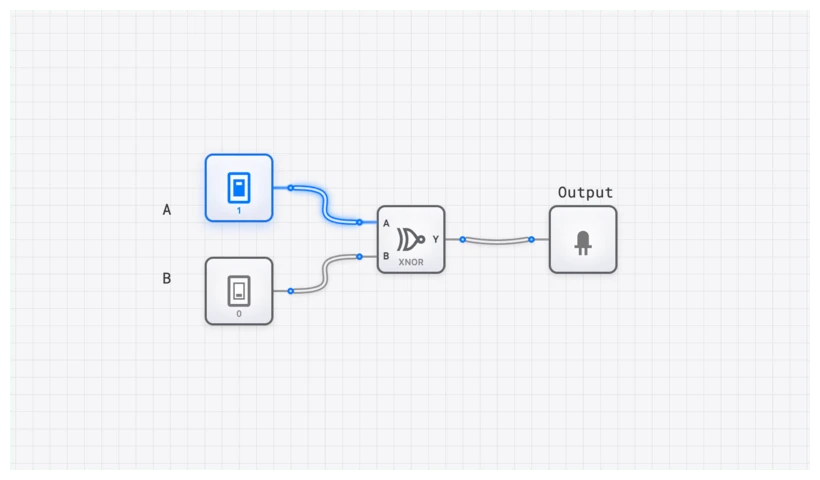
Explore the XNOR Simplified Circuit
Common Pitfall: Why Gray Code is Non-Negotiable
A common error is drawing K-maps using standard binary ordering — 00, 01, 10, 11. Don’t.
If you use standard binary, you break the principle of adjacency. Look at the jump from 01 to 10. Both bits change ( and ). If you have ‘1’s in those two adjacent cells, you cannot simplify them because more than one variable is shifting. The Gray code sequence (00, 01, 11, 10) ensures that every single step you take on the map represents a change in exactly one variable. This is the “magic” that allows the math to work visually. Without Gray code, the K-map is just a confusing table; with it, it’s a calculator.
Verification with OSCILLOSCOPE_8CH
One of the most satisfying moments in digital engineering is proving that your “small” circuit does the exact same thing as the “big” one. On digisim.io, you can do this in real-time.
- Build the Brute Force: Use eight AND gates and one massive OR gate to represent the original minterms.
- Build the Optimized: Place a single XNOR gate (or the two-AND-one-OR equivalent) below it.
- Sync the Inputs: Connect the same four INPUT_SWITCH components to both circuits.
- Analyze: Connect the output of the brute-force circuit to Channel 1 of an OSCILLOSCOPE_8CH and the optimized output to Channel 2.
As you toggle the switches through all 16 combinations, the waveforms on the OSCILLOSCOPE_8CH will be identical. However, if you were to look at the propagation delay (), you’d notice the optimized circuit responds significantly faster. In a high-speed CPU project, those nanoseconds are the difference between a 1MHz clock and a 10MHz clock.
Real-World Applications: Beyond the Classroom
K-maps aren’t just for passing exams; they are the bread and butter of hardware description.
1. ALU Control Logic
In a typical 8-bit CPU, the ALU (Arithmetic Logic Unit) needs to know whether to add, subtract, or perform a bitwise AND based on an “opcode.” This opcode might be 4 bits wide. Engineers use K-maps to design the decoder logic that takes that 4-bit opcode and activates the specific control lines for the ADDER_8BIT or the COMPARATOR_8BIT. By minimizing this logic, they reduce the “instruction decode” time, which is a critical bottleneck in CPU performance.
2. Finite State Machines (FSMs)
Whether it’s a traffic light controller or a complex protocol handler, FSMs rely on “next-state logic.” This logic looks at the current state (stored in a REGISTER) and the current inputs to decide what the next state should be. These truth tables get massive quickly. K-maps allow designers to find the most efficient way to route those signals, often saving dozens of gates in the final implementation.
Common Pitfalls
Common mistakes to avoid:
- Floating Inputs: Every input of every AND gate must be tied to something. A floating input may behave predictably in a simulator, but in real hardware it picks up noise.
- Missing the Wrap-Around: Check the corners and edges. Some of the most elegant simplifications come from grouping the four corners or the top and bottom rows.
- Redundant Groups: Once all 1s are covered, stop. Adding an extra group “because it looks nice” puts unnecessary gates into the circuit and defeats the purpose of the K-map.
The Power of Don’t Care Conditions
In many real designs, certain input combinations can never occur. For example, a BCD (Binary-Coded Decimal) system uses 4 bits to represent digits 0-9, so the combinations 1010 through 1111 never appear. In a K-map, you mark these impossible inputs with an (don’t care) instead of 0 or 1.
The key: you can treat each as either 0 or 1 — whichever helps you form a larger group. Since these inputs never occur in practice, it does not matter what the circuit outputs for them.
Example: Suppose a 4-variable function has 1s at cells 0, 2, 8, 10 and don’t cares at cells 4, 6, 12, 14. Without the don’t cares, the four 1s group into (two literals — a four-cell group covering the corners of the K-map). Treating all four don’t-cares as 1s extends the group to every cell where , an eight-cell group that simplifies all the way down to (one literal). Don’t-care conditions frequently reduce the final gate count by 20-30% in real designs.
Take the Next Step
This post is part of the Boolean Algebra Fundamentals series. Related reading:
- Mastering Boolean Algebra — the algebraic identities behind K-map grouping.
- Mastering Sum-of-Products (SOP) — the canonical form K-maps produce.
- Beyond Sum-of-Products: Product-of-Sums — the dual minimization.
- De Morgan’s Laws — the transformation rules used to convert between forms.
The Karnaugh map turns a complex algebraic task into a visual puzzle. For functions up to 4 variables, it reliably produces minimal SOP (or POS) expressions. For 5–6 variables, K-maps are still usable but unwieldy; algorithmic methods like Quine–McCluskey take over.
Build the brute-force and optimized circuits from the worked example, and watch the waveforms align on the oscilloscope. Start a fresh circuit to verify.